Testing Camera and Gallery in Android: Emulating Image Loading in UI Tests

Author: Dmitrii Nikitin, a Android Team Leader at Quadcode with over 7 years of experience in developing scalable mobile solutions and leading Android development teams.

A lot of Android apps request the user to upload images. Social media apps, document scanners, cloud storage providers, you name it. These scenarios are left without any automated tests because developers would rather not try to open the camera or the gallery.

But the fact is, such difficulties can be surpassed. In this article, I will discuss simulating the camera and gallery behavior in emulators, injecting specific images for testing purposes, intent mocking, and how to know when such methods are not enough for thorough testing.

Emulating Camera Images in Android Emulator

The Android emulator is able to display arbitrary images as camera sources, which is extremely convenient if you’re writing flows like “take a picture” or “scan a document” and you’d like the camera to display the same image under all circumstances.

Setting Up Custom Camera Images

The emulator uses a scene configuration file located at:

$ANDROID_HOME/emulator/resources/Toren1BD.posters

You can add a poster block to this file with these attributes:

poster custom
size 1.45 1.45
position 0.05 -0.15 -1.4
rotation -13 0 0
default custom-poster.jpg

This setting determines:

  • default: The path to the image used as the camera feed
  • size, position, rotation: Image size, position, and rotation angle parameters in the scene

Automating Image Setup

You can automatize this process through a shell command:

sed -i ’1s,^,poster custom\n size 1.45 1.45\n position 0.05 -0.15 -1.4\n rotation -13 0 0\n default custom-poster.jpg\n,’ $ANDROID_HOME/emulator/resources/Toren1BD.posters

Here is a Kotlin script that copies the required file into the correct position:

class SetupCameraImageScenario(private val imageFileName: String): BaseScenario<ScenarioData>() {
    override val steps: TestContext<ScenarioData>.() -> Unit = {
        val androidHome = System.getenv("ANDROID_HOME") ?: error("ANDROID_HOME is required")
        val posterPath = "$androidHome/emulator/resources/custom-poster.jpg"
        val localImagePath = "src/androidTest/resources/$imageFileName"
        val cmd = "cp $localImagePath $posterPath"
        Runtime.getRuntime().exec(cmd).waitFor()
    }
}

Injecting Images into Gallery

(Intent.ACTION_PICK) is less of a pain than camera testing, but with one crucial gotcha: copying to internal storage alone is not enough. If you simply copy an image file, it will not appear in the system picker.

An image must be written to the correct folder to be pickable, and must also be registered in MediaStore.

Proper Gallery Image Setup

The process involves:

  1. Declaring the name, type, and path of the image (e.g., Pictures/Test)
  2. Obtaining a URI from MediaStore and storing the image content into it

You can implement it as follows:

class SetupGalleryImageScenario(private val imageFileName: String) : BaseScenario<Unit>() {
    override val steps: TestContext<Unit>.() -> Unit = {
        step("Adding image to MediaStore") {
            val context = InstrumentationRegistry.getInstrumentation().targetContext
            val resolver = context.contentResolver
            
            val values = ContentValues().apply {
                put(MediaStore.Images.Media.DISPLAY_NAME, imageFileName)
                put(MediaStore.Images.Media.MIME_TYPE, "image/jpeg")
                put(MediaStore.Images.Media.RELATIVE_PATH, "Pictures/Test")
            }
            
            val uri = resolver.insert(MediaStore.Images.Media.EXTERNAL_CONTENT_URI, values)
            checkNotNull(uri) { "Failed to insert image into MediaStore" }
            
            resolver.openOutputStream(uri)?.use { output ->
                val assetStream = context.assets.open(imageFileName)
                assetStream.copyTo(output)
            }
        }
    }
}

Now that test is opening the gallery, the required image will be visible among the options.

Selecting Images from Gallery

After you’ve placed the image in the MediaStore, you need to call Intent.ACTION_PICK and select the appropriate file in the UI. That’s where UiAutomator is useful, as the picker UI varies across versions and Android:

  • Photo Picker (Android 13+)
  • System file picker or gallery on older Android versions

In order to support both, create a wrapper:

class ChooseImageScenario<ScenarioData>(
    onOpenFilePicker: () -> Unit,
) : BaseScenario<ScenarioData>() {
    override val steps: TestContext<ScenarioData>.() -> Unit = {
        if (PickVisualMedia.isPhotoPickerAvailable(appContext)) {
            scenario(ChooseImageInPhotoPickerScenario(onOpenFilePicker))
        } else {
            scenario(ChooseImageInFilesScenario(onOpenFilePicker))
        }
    }
}

Both approaches start in the same way by calling onOpenFilePicker() (typcally a button click in the UI), then:

  • ChooseImageInPhotoPickerScenario: Locates and taps the image within Photo Picker
  • ChooseImageInFilesScenario: Opens the system file manager (for example, locating the file name via UiSelector().text(“test_image.jpg”) and opening it)

This approach covers both kinds of scenarios, making picking an image general and robust.

Intent Mocking: When Real Camera or Gallery Isn’t Necessary

Most of the tests will not require opening actual camera or gallery apps. To test app response after an image is received, you can mock the response of the external app using Espresso Intents or Kaspresso.

For example, when you’re testing that a user “took a picture” and subsequently the UI displays the correct picture or triggers a button, you don’t need to open the camera. You can simulate the result to get this accomplished:

val resultIntent = Intent().apply {
    putExtra("some_result_key", "mocked_value")
}
Intents.intending(IntentMatchers.hasAction(MediaStore.ACTION_IMAGE_CAPTURE))
    .respondWith(Instrumentation.ActivityResult(Activity.RESULT_OK, resultIntent))

When startActivityForResult(.) is invoked by the app to launch the camera, the test gets an immediate precooked result, such as the image being captured and returned. The camera is not launched, so the test is fast and predictable.

This strategy proves useful when:

  • You are less concerned about selection or capture process but more concerned about processing outcomes
  • You have to make test execution faster
  • You need to avoid dependencies on different versions of camera/galleries on devices

When Mocking Isn’t Sufficient

Sometimes it’s also necessary to stress-test not just that the app returns results correctly, but that it acts correctly in actual usage, such as when the user isn’t using it and the system boots it out of RAM. An example of that is DNKA (Death Not Killed by Android).

Understanding DNKA

DNKA happens when Android quietly unloads your app because of memory pressure, loss of focus, or dev settings explicit unloading. onSaveInstanceState() may be invoked but onDestroy() may not. Users come back in and expect the app to “restore” itself into the same state. Ensure that you:

  • Check if ViewModel and State are properly rebuilt
  • Check that the screen crashes if no saved state exists
  • Check that SavedStateHandle is as expected
  • If user interaction (photo selection, form input, etc.) is preserved

Enabling DNKA

The simplest way of enabling behavior in which Android terminates activities forcefully is through developer system settings:

Developer Options → Always Finish Activities

You can achieve with ADB:

adb shell settings put global always_finish_activities 1
# 1 to enable, 0 to disable

That background aside, any external activity launch (camera or gallery) will result in your Activity destroyed. When you go back to the app, it’ll need to recreate state from scratch, precisely what we’d like to test.

Why Intent Mocks Don’t Help Here

When using mocked intents:

Intents.intending(IntentMatchers.hasAction(MediaStore.ACTION_IMAGE_CAPTURE))
    .respondWith(Instrumentation.ActivityResult(Activity.RESULT_OK, resultIntent))

The external application is never started, so Android won’t even unload your Activity. The mock is instant responsive, so it’s not possible to test DNKA scenarios.

When Real Intents Are Necessary

To verify DNKA behavior, Android actually needs to unload the Activity. This means actually performing an actual external Intents: take a picture, select from the gallery, or third-party apps. Only this is capable of simulating when users open another application and your application “dies” in the background.

Conclusion

Automated testing sometimes has added the requirement to “see” images, and this issue is not as sneaky as it may seem. Testing photo loading from camera or gallery choice actually doesn’t involve real devices or manual testing. Emulators let you pre-place required images and simulate them as though users just selected or took files.

While intent mocking can be sufficient in some cases, for others complete “real” experience is necessary in order to guarantee recovery from activity cancellation. The trick is choosing the right method for your specific test scenario. 

Understanding these methods enables you to gain complete testing of image-related functionality so that your app handles well in happy path and edge case scenarios like system-induced process death. With proper setup, you can create robust, stable tests for the full gamut of user activity across camera and gallery functionality.

Whether you are writing tests for profile picture uploads, document scanning, or something else that involves images, these practices provide the foundation for good automated testing without jeopardizing coverage or reliability.

Learning SwiftUI as a Designer. A guide

Author: Oleksandr Shatov, Lead Product Designer at Meta

***

Recently, I have received many messages from fellow designers about transitioning from static design tools to creating a real iOS app using SwiftUI. In this article, I will describe my journey, sharing my favourite resources, practical tips, and the best tools for designers who want to master the framework and release their apps. 

Why SwiftUI is a Game-Changer for Designers 

SwiftUI is Apple’s framework for building user interfaces in iOS, iPadOS, macOS, watchOS, and tvOS. 

SwiftUI’s built-in modifiers for styling, animations, and gestures allow designers to create complex interfaces with minimal code. Specialists can also use native features like haptics, cameras, and sensors to make designs authentic. 

SwiftUI helps to ship real apps. The gap between design and development has shrunk, so designers can now turn their ideas into products accessible to millions of users. 

Getting Started: SwiftUI Basics

If you are new to SwiftUI, One of the best sources I have found is a YouTube course where every lesson begins from a blank page with detailed explanations. It covers everything from basics and modifiers to more advanced concepts

Some of the topics to focus on: 

  • Basics: Creating and styling basic UI elements like Text, Image, Buttons, and a To-Do list
  • Tools: Mastering HStack, VStack, and ZStack for arranging the interface
  • Navigation: Moving between screens and managing app flow
  • Case Studies: Rebuilding Spotify, Bumble, and Netflix with SwiftUI

After learning the basics, you can move to building real apps. 

How to build real apps 

Another YouTube channel I recommend specialises in building apps like Tinder and Instagram from scratch. These videos explain the entire process – from setting up the project and organising your code to implementing other features (authentication, data storage, and animation). 

My main takeaway from the tutorials is that building a simple app comes first.

Remember to take every real-world project as a learning opportunity. Creating code, organising files, and implementing features helps you acquire the developer’s mindset and understand how designs work and scale.

Each app you build brings you closer to mastering SwiftUI. With time and practice, you will become more confident in tackling complex projects and implementing your ideas into fully functional apps. 

To be inspired

Learning a new skill can be overwhelming. Therefore, inspiration and motivation are necessary. I highly recommend reading articles by Paul Stamatiou, especially his piece on building apps as a designer. His experience proves that anything is possible with persistence and the right tools. 

AI to be your code partner 

AI tools were also beneficial for my learning process. My favourite is Cursor, an advanced code editor integrating Anthropic’s Claude Sonnet. It gives you full access to Xcode project files and helps you instantly debug, refactor, and generate code. 

The reasons Cursor stands out: 

  • Other AI tools, such as the new GPT with Canvas, cannot access the file structure. Cursor understands the entire project. 
  • There is no native AI inside Xcode yet. However, Cursor’s integration is smooth

Integrating AI into your workflow lets you focus more on design and user experience – the creative side of the work. Instead of you, AI will handle the repetitive or complex coding tasks. 

Challenges and the future

When learning SwiftUI, you will encounter bugs, error messages, and frustration. Therefore, I would like to share some tips on how to overcome the issues. 

  • Step by step: The aforementioned YouTube videos are created for different skill levels – basic, intermediate, and advanced. Follow these levels accordingly. 
  • Establish a consistent learning schedule: Learning SwiftUI requires focus and regular practice to become proficient. I suggest frequent sessions rather than sporadic intensive study periods, as they are more effective.  

The line between design and development is blurring, especially with the emergence of AI; this process will continue. You can now create a functional app using the basics and tips I have shared in this article.

At first, you might feel overwhelmed by the complexity of real apps, especially regarding user authentication, data management, or animation. However, you can build confidence and competence by breaking down large tasks into smaller steps and applying what you have learned. 

Mastering SwiftUI might be complicated, but it is still possible. 

The Designer’s Toolkit for SwiftUI in 2024 

Here is the final list of the tools that have helped me achieve success as a designer learning SwiftUI: 

If you have your favourite resources for learning SwiftUI, please share them.

Winning in a Privacy-First Era: First-Party Data Strategies and the Role of the CDP

As privacy rules tighten, relying on third-party data is becoming more risky. Most customer-facing brands will soon depend almost entirely on their own first-party information. A Customer Data Platform, or CDP, is poised to be the backbone of that new strategy.

For several years a growing wave of laws and tech changes has limited how companies follow and target people with outside data-that is, data collected by firms that never interact directly with the end user.

  • Regulations such as the EU’s General Data Protection Regulation or GPDR and California’s Consumer Privacy Act, CCPA, have already raised global standards for how data is gathered and used. More regions are sure to roll out similar rules in the near future.
  • Smartphone makers are stepping in, too. Last year Apple’s decision to sunset the IDFA, or Identifier for Advertisers, made it much harder for brands to quietly track users across apps and sites and serve ads as they once did.
  • The biggest jolt to online ads came from Google back in 2019 when the company said it would dump third-party cookies. To give brands and publishers time to adjust, that change was pushed ahead to 2023. Now, Google is pitching Topics, the replacement for its earlier FLOC plan, as the main tool for a cookieless future.

Consumers are speaking up more loudly about their privacy these days. A March 2022 survey by the Consumer Technology Association showed that roughly two-thirds of U.S. adults worry a lot about how internet gadgets use their personal information.

Because of that pushback, relying on third-party data to guide sales and marketing has become risky business. That change hits the 88% of marketers who traditionally leaned on outside data to build a fuller picture of every shopper. Moving forward, brands will need to gather insights straight from the people they actually interact with. You can already guess what that means for anyone in sales or marketing.

First, we have to make every effort-whether through helpful newsletters, free trials, downloadable guides, or quality blog posts-to encourage customers to share their contact info. Getting that permission is just the starting line for a solid first-party data game plan.

Not starting from scratch

Large companies almost always have piles of first-party data just waiting to be put to good use. The trouble is that when this data sits in separate programs and departments, it fights against the seamless, on-line experience everyone keeps talking about. In fact, more than half of marketers (54%) say poor quality and missing data is the single biggest roadblock to running campaigns that really feel data driven. And as newer platforms like TikTok and connected TV become standard parts of the mix, that problem is unlikely to get better on its own.   

Think of first-party customer data as a stack of loose tiles all over the floor of the business. If you want a tidy picture, you need a tool that picks those pieces up and lays them out in a clear pattern. That’s exactly the role a Customer Data Platform (CDP) was built to play.

Unlike the familiar Data Management Platforms that mainly focus on outside data, a Customer Data Platform pulls in every piece of information you have-even Personally Identifiable Information or PII. It collects both clearly named and pseudonymous data from every channel and arranges everything in one clean format. While sorting, the system filters out weird data points and mistakes, raising the overall trustworthiness of what you see. Strong usage rules then help make sure the data is handled openly and fairly, giving customers more power over their own PII.

Now that customer data platforms are a bit older, many of them use Artificial Intelligence to fill in missing pieces of a customer’s story. Over time, they will even craft digital twins-a kind of educated guess profile-for shoppers whose past behavior you can’t see, borrowing clues from people who look similar.

With this tech, your team can gather clear, privacy-friendly profiles without spending days manually stitching emails, website clicks, and in-store visits together. The platform can also suggest the best moment to gently ask a buyer for new information. Just as important, the CDP should work in real time, so every decision sits on the freshest data, not yesterday’s news. Taken together, a real-time system gives brands one united 360-degree picture of each shopper, making truly personal, seamless experiences possible across every channel.

The Best Survivors are the Best Adapters

A Real-Time Customer Data Platform lets you pull together first-party info from websites, apps, and other channels and show all that data in one clear place. By doing so, you can replace what third-party cookies once did and still learn what each person prefers at this very moment.

The clearer view lets you send the right message at the right time-today, tonight, or next week-rather than hoping you guessed correctly in advance.

When your outreach feels personal and accurate, customers notice, trust grows, and long-term relationships form. That kind of agility keeps your business moving forward even in a cookieless future.

Building serverless pipeline using AWS CDK and Lambda in Python

Creating a serverless pipeline using AWS CDK alongside AWS Lambda in Python allows for event-driven applications which can easily be scaled without worrying about the underlying infrastructure. This article describes the process of creating and setting up a serverless pipeline step by step in AWS CDK and Python Lambda with Visual Studio Code (VS Code) as the IDE.

Completing this guide enables the deployment of a fully working AWS Lambda function with AWS CDK.

Understanding Serverless Architecture and Its Benefits

A serverless architecture is a cloud computing paradigm where the developers need to write the code as functions and these functions get executed upon receiving an event or request. These functions will execute without any server provisioning or management. Execution and resource allocation are automatically managed by the cloud provider – in this instance, AWS.

Key Characteristics of Serverless Architecture:

  1. Event-Driven: Functions are triggered by events such as S3 uploads, API calls, or other AWS service actions.
  2. Automatic Scaling: The platform automatically scales based on workload, handling high traffic without requiring manual intervention.
  3. Cost Efficiency: Users pay only for the compute time used by the functions, making it cost-effective, especially for workloads with varying traffic.

Benefits:

Serverless architecture comes with numerous advantages that are beneficial for modern applications in the cloud. One of the most notable benefits of serverless architecture is improved operational efficiency due to the lack of server configuration and maintenance. Developers are free to focus on building and writing code instead of worrying about managing infrastructure. 

Serverless architecture has also enabled better workload management because automatic scaling allows serverless platforms to adjust to changing workloads without human interaction, making traffic spikes effortless. This kind of adaptability maintains high performance and efficiency while minimizing costs and resource waste.

In addition, serverless architecture has proven to be financially efficient, allowing users to pay solely for the computing resources they utilize, as opposed to pre-purchased server capacity. This flexibility is advantageous for workloads with unpredictable or fluctuating demand. Finally, the ease of use provided by serverless architecture leads to an accelerated market launch because developers can rapidly build, test, and deploy applications without the tedious task of configuring infrastructure, leading to faster development cycles.

Understanding ETL Pipelines and Their Benefits

ETL (Extract, Transform, Load) pipelines automate the movement and transformation of data between systems. In the context of serverless, AWS services like Lambda and S3 work together to build scalable, event-driven data pipelines.

Key Benefits of ETL Pipelines:

  1. Data Integration: Combines disparate data sources into a unified system.
  2. Scalability: Services like AWS Glue and S3 scale automatically to handle large datasets.
  3. Automation: Use AWS Step Functions or Python scripts to orchestrate tasks with minimal manual intervention.
  4. Cost Efficiency: Pay-as-you-go pricing models for services like Glue, Lambda, and S3 optimize costs.

Tech Stack Used in the Project

For this serverless ETL pipeline, Python is the programming language of choice while Visual Studio Code serves as the IDE. The architecture is built around AWS services such as AWS CDK for resource definition and deployment, Amazon S3 as the storage service, and AWS Lambda for running serverless functions. All these in combination build a strong robust and scalable serverless data pipeline.

The versatility and simplicity associated with Python, as well as its extensive library collection, make it an ideal language for Lambda functions and serverless applications. With AWS’s CDK (Cloud Development Kit), the deployment of cloud resources is made easier because infrastructure can be defined programmatically in Python and many other languages. AWS Lambda is a serverless compute service which scales automatically and charges only when functions are executed, making it very cost-effective for event-driven workloads. Amazon S3 is a highly scalable object storage service that features prominently in serverless pipelines as a staging area for raw data and the final store for the processed results. These components create the building blocks of a cost-effective and scalable serverless data pipeline.

  • Language: Python
  • IDE: Visual Studio Code
  • AWS Services:
    • AWS CDK: Infrastructure as Code (IaC) tool to define and deploy resources.
    • Amazon S3: Object storage for raw and processed data.
    • AWS Lambda: Serverless compute service to transform data.

Brief Description of Tools and Technologies:

  1. Python: A versatile programming language favored for its simplicity and vast ecosystem of libraries, making it ideal for Lambda functions and serverless applications.
  2. AWS CDK (Cloud Development Kit): An open-source framework that allows you to define AWS infrastructure in code using languages like Python. It simplifies the deployment of cloud resources.
  3. AWS Lambda: A serverless compute service that runs code in response to events. Lambda automatically scales and charges you only for the execution time of your function.
  4. Amazon S3: A scalable object storage service for storing and retrieving large amounts of data. In serverless pipelines, it acts as both a staging and final storage location for processed data.

Building the Serverless ETL Pipeline – Step by Step

In this tutorial, we’ll guide you through setting up a serverless pipeline using AWS CDK and AWS Lambda in Python. We’ll also use Amazon S3 to store data.

Step 1: Prerequisites

To get started, ensure you have the following installed on your local machine:

  • Node.js (v18 or later) → Download Here
  • AWS CLI (Latest version) → Install Guide
  • Python 3.x (v3.9 or later) → Install Here
  • AWS CDK (Latest version) → Install via npm.
  • Visual Studio Code Download Here
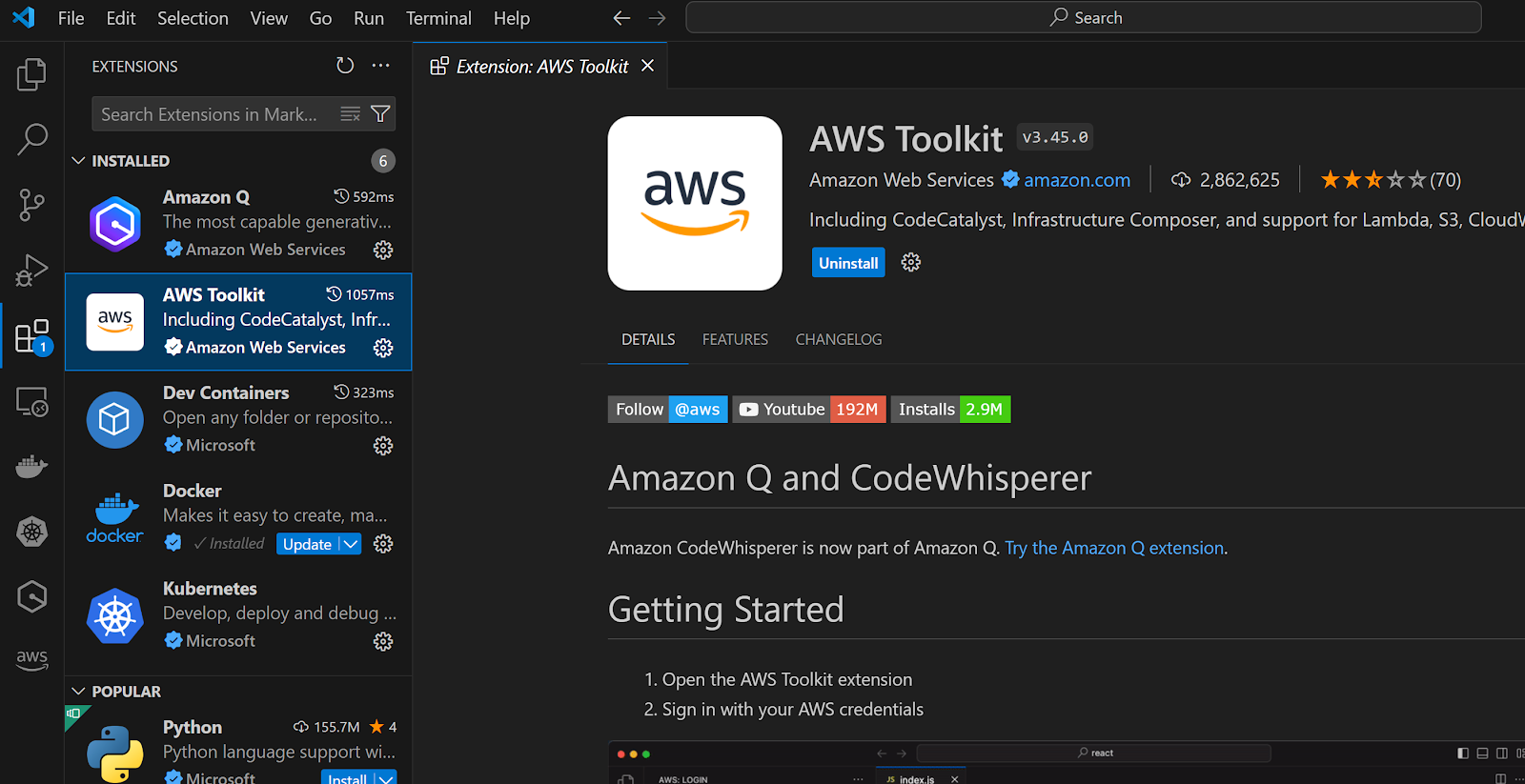
  • AWS Toolkit for VS Code (Optional, but recommended for easy interaction with AWS)
Configure AWS CLI

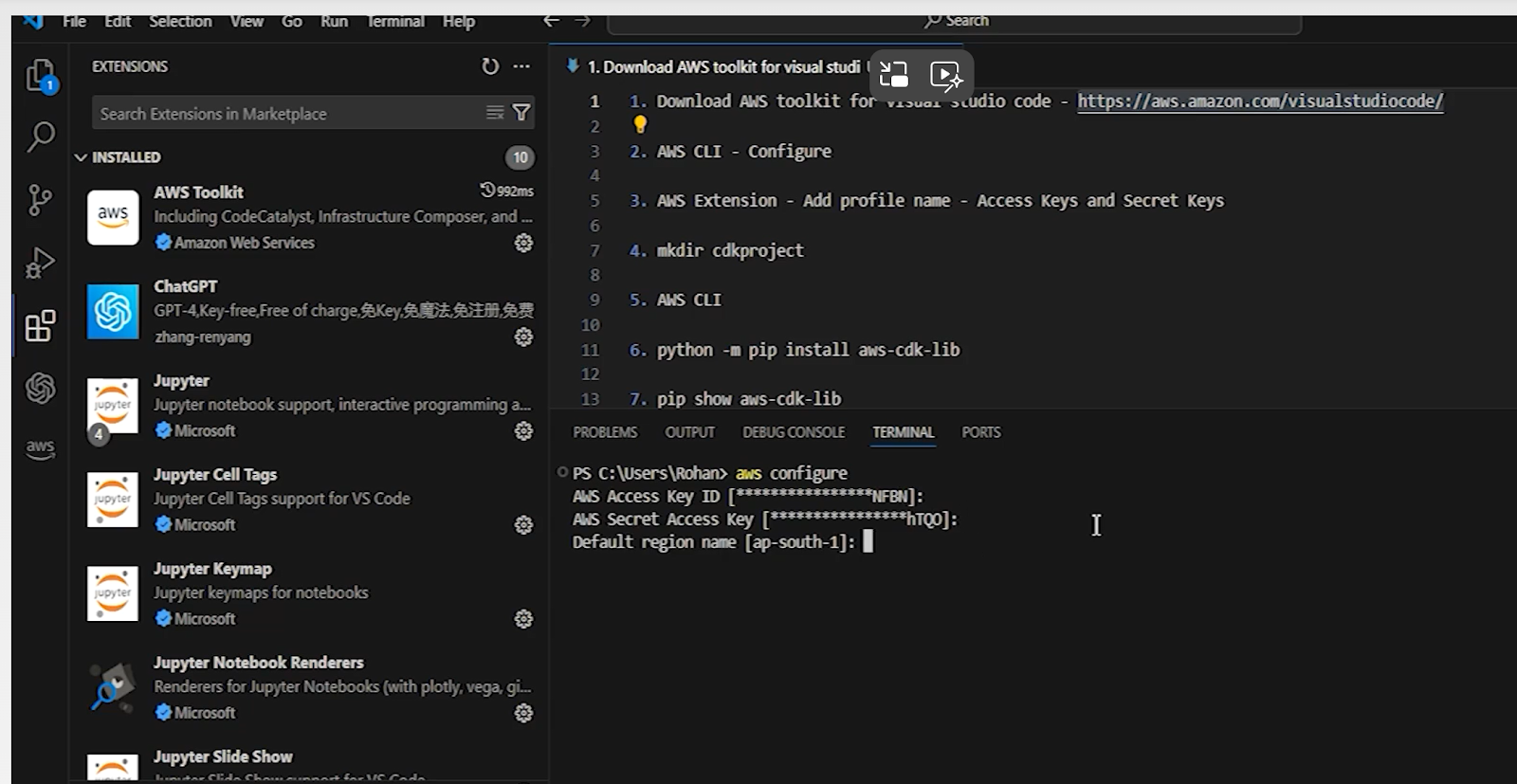
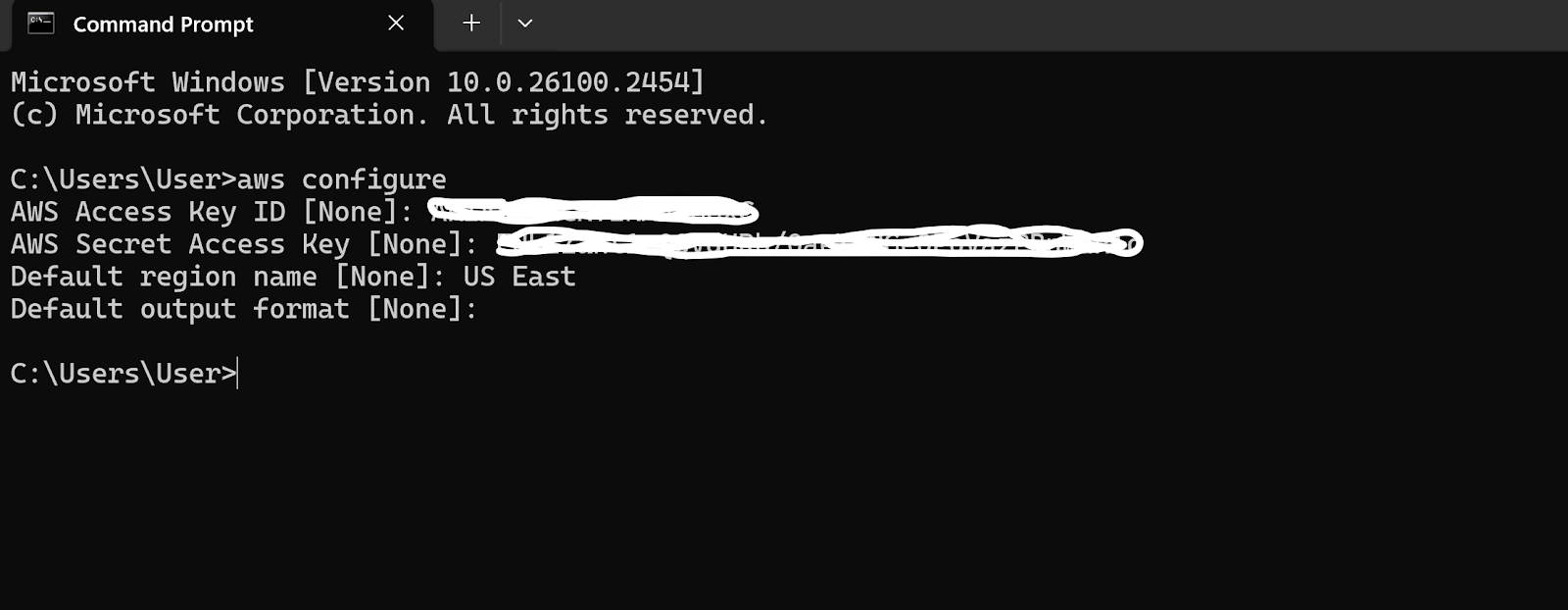
To configure AWS CLI, open a terminal and run:

A screenshot of a computer

AI-generated content may be incorrect.

aws configure

A screenshot of a computer

Enter your AWS Access Key, Secret Access Key, default region, and output format when prompted.

Install AWS CDK
A screenshot of a computer

AI-generated content may be incorrect.

To install AWS CDK globally, run:

npm install -g aws-cdk

Verify the installation by checking the version:

cdk --version

Login to AWS from Visual Studio Code

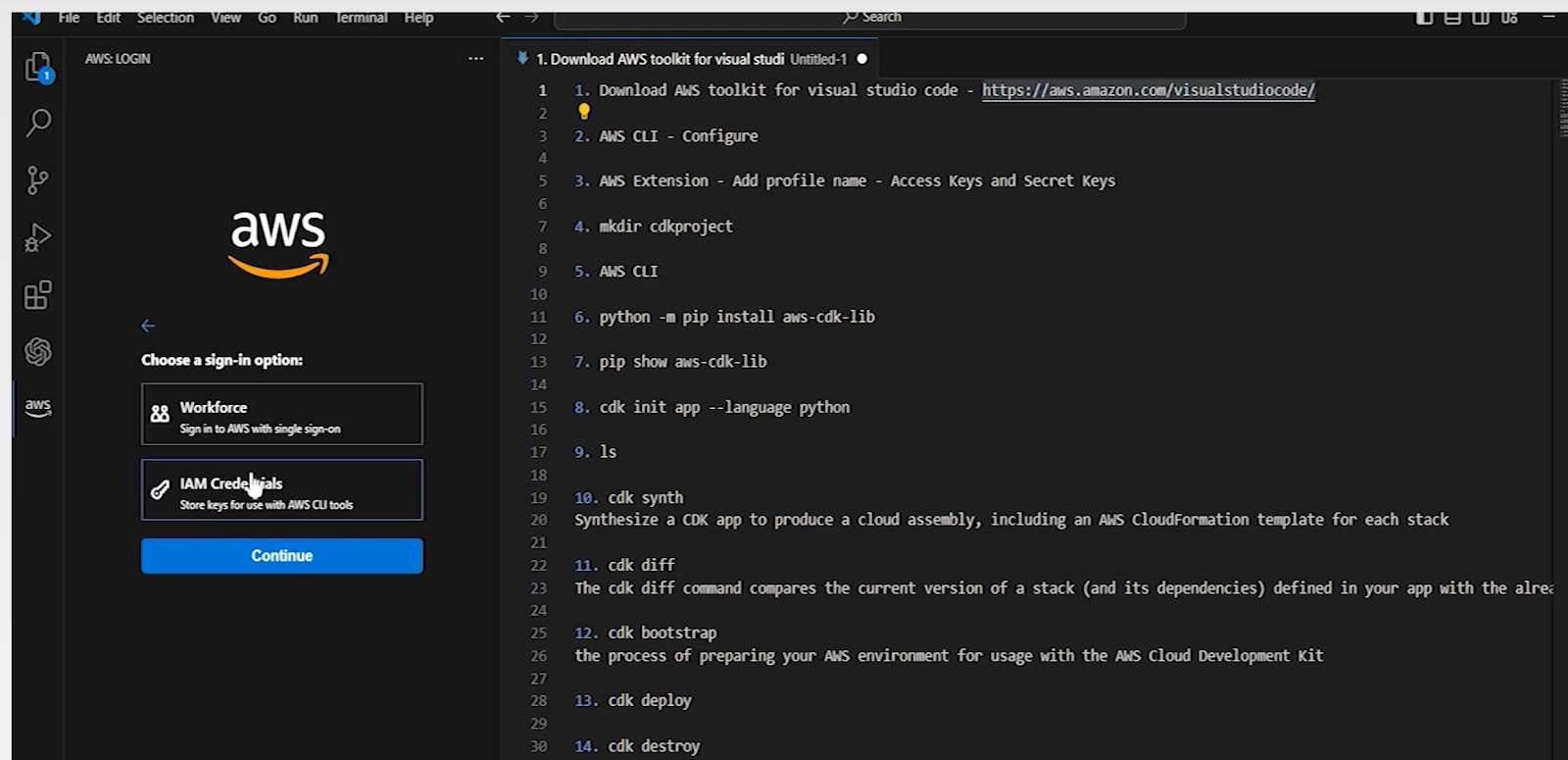
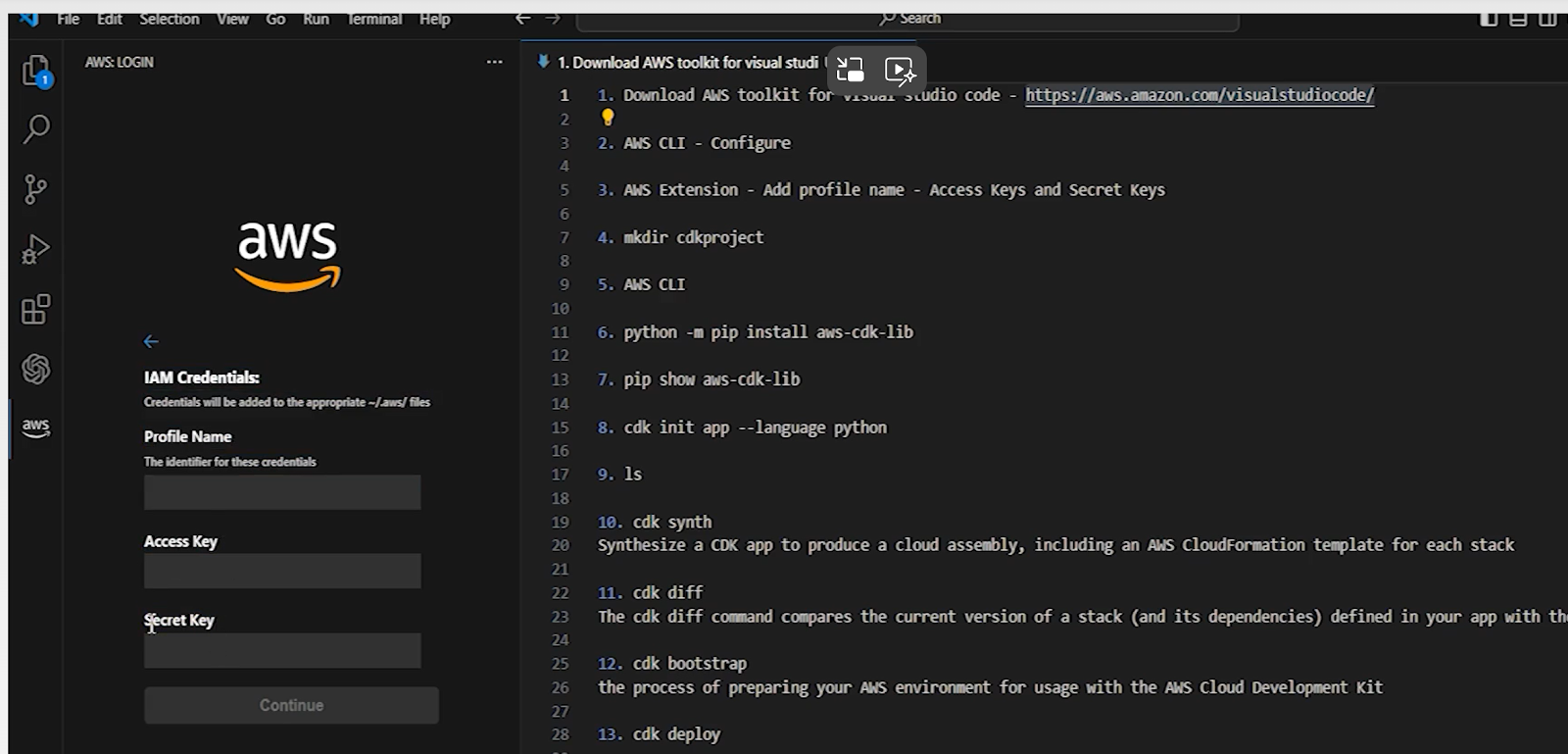
Click on the AWS logo on the left side, it will ask for credentials for the first time

A screenshot of a computer

AI-generated content may be incorrect.

For the profile name use the Iam user name

A screenshot of a computer

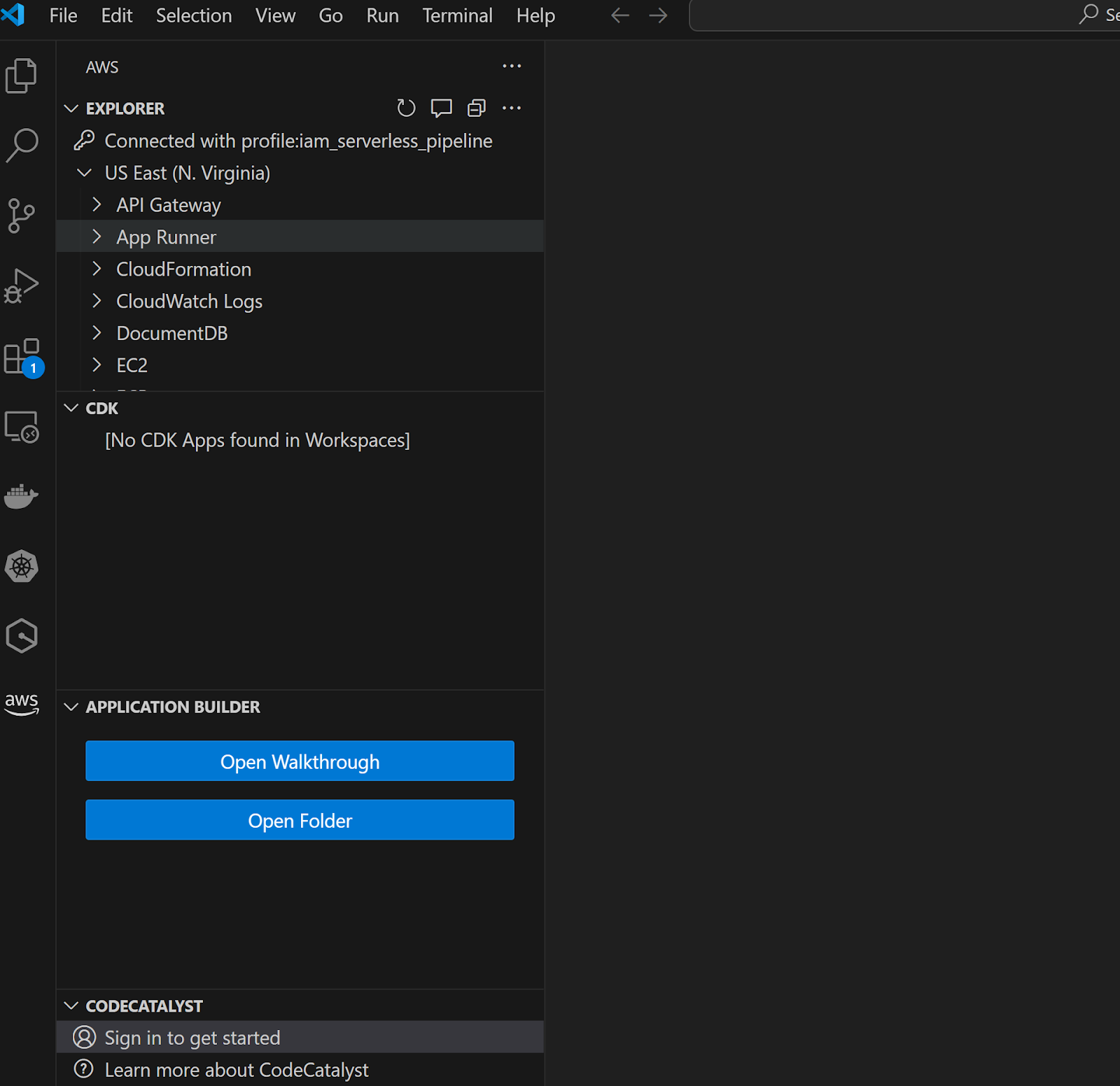
After signing in the IDE will appear as below.

A screenshot of a computer

Step 2: Create a New AWS CDK Project

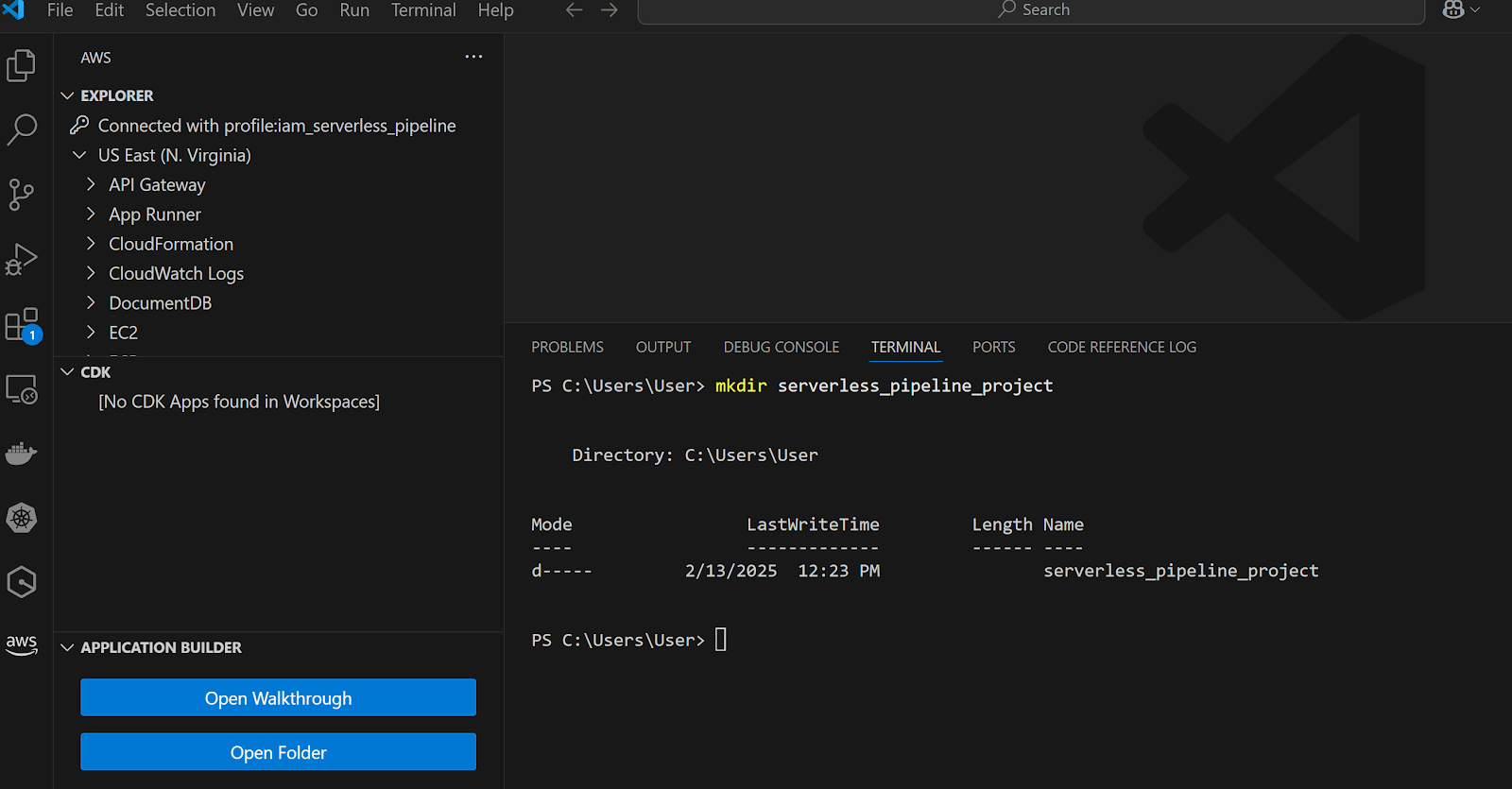
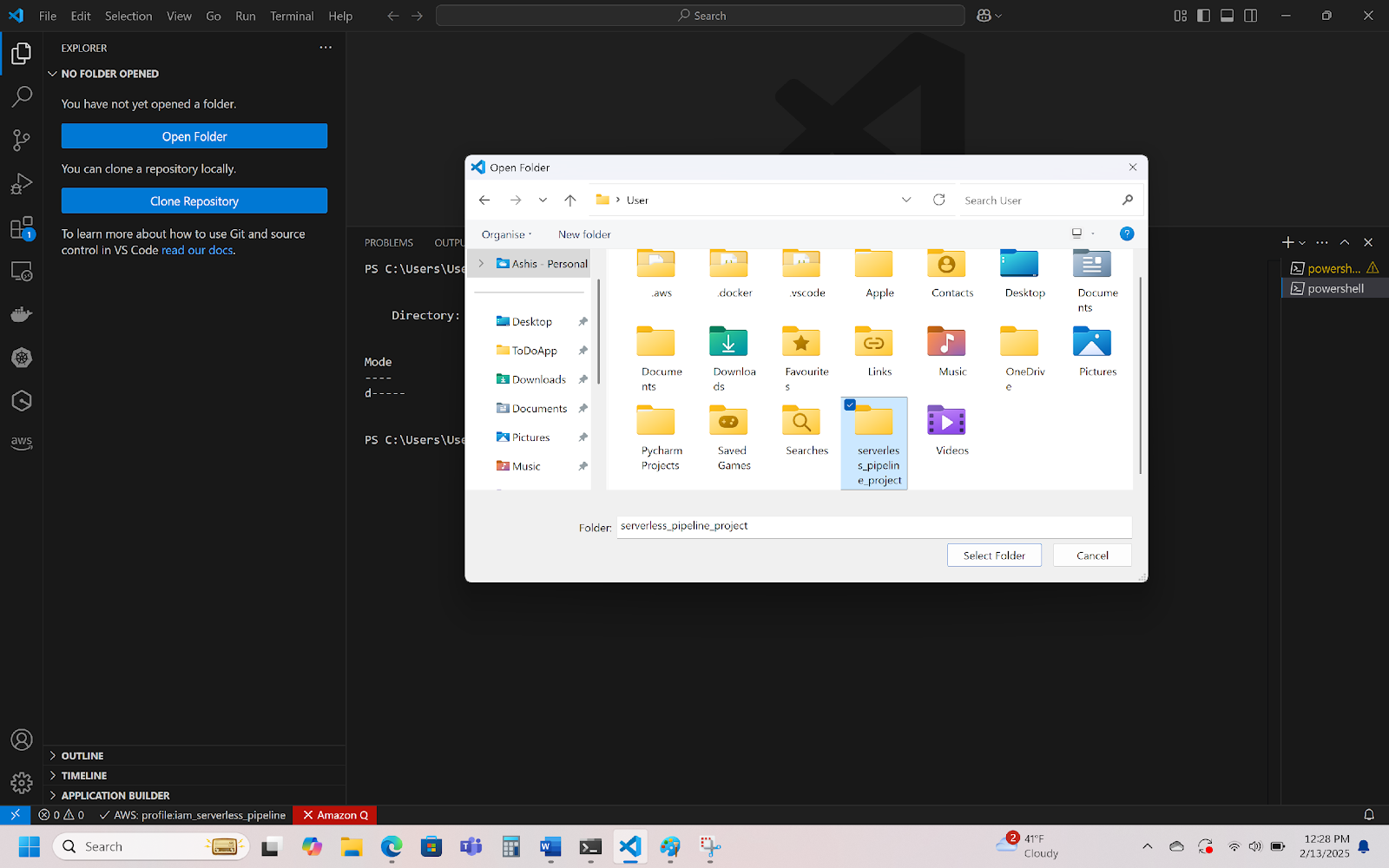
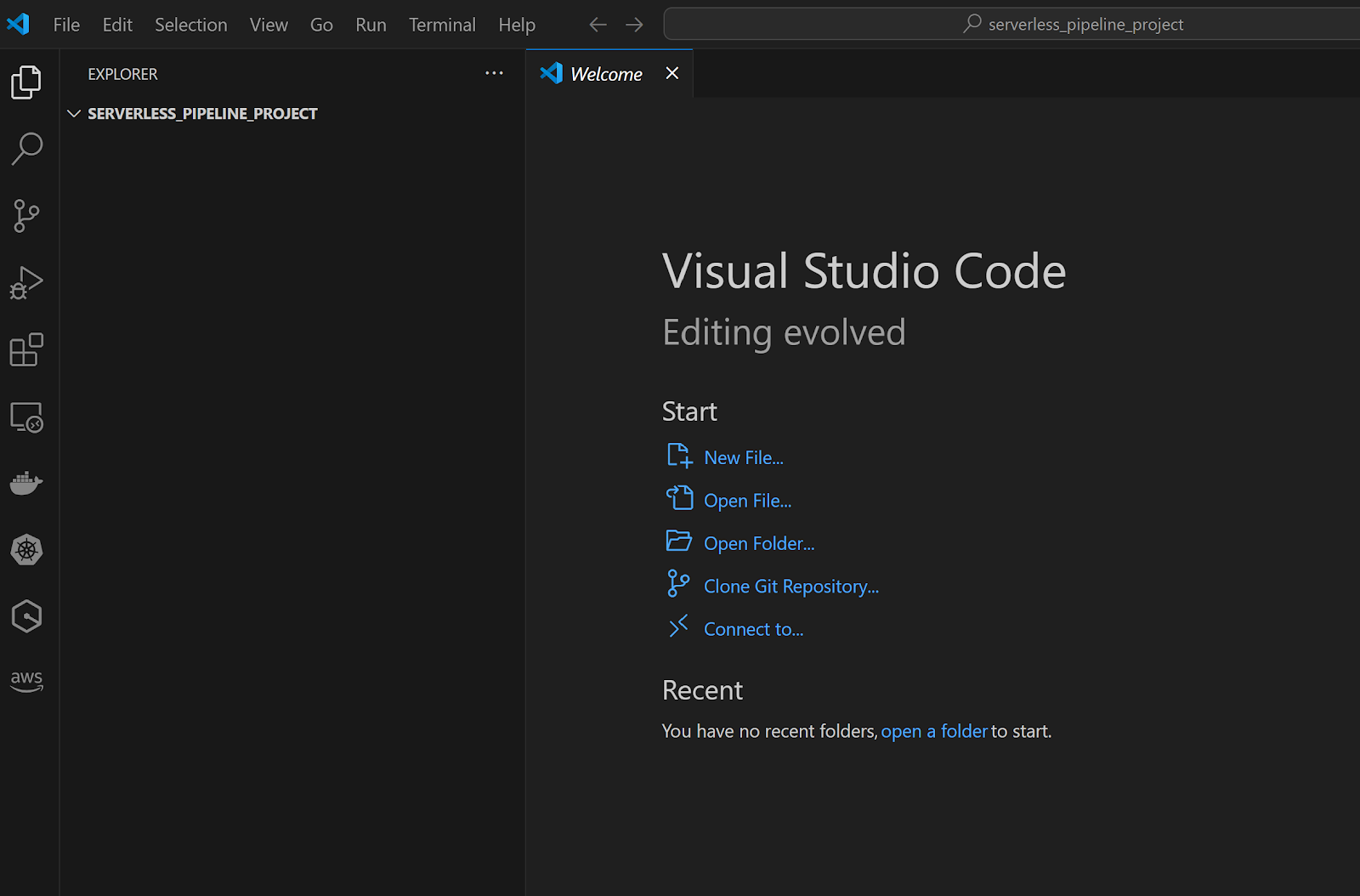
Open Visual Studio Code and create a new project directory:

mkdir serverless_pipeline_project

cd serverless_pipeline_project

A screenshot of a computer
A computer screen shot of a computer screen
A screenshot of a computer

Initialize the AWS CDK project with Python:

cdk init app --language python
This sets up a Python-based AWS CDK project with the necessary files.

Step 3: Set Up a Virtual Environment

Create and activate a virtual environment to manage your project’s dependencies:

python3 -m venv .venv

source .venv/bin/activate  # For macOS/Linux

# OR

.venv\Scripts\activate  # For Windows

python3 -m venv .venv

source .venv/bin/activate  # For macOS/Linux

# OR

.venv\Scripts\activate  # For Windows

Install the project dependencies:

pip install -r requirements.txt

Step 4: Define the Lambda Function

Create a directory for the Lambda function:

mkdir lambda

Write your Lambda function in lambda/handler.py:

import boto3

import os

s3 = boto3.client('s3')

bucket_name = os.environ['BUCKET_NAME']

def handler(event, context):

    # Example: Upload processed data to S3

    s3.put_object(Bucket=bucket_name, Key='output/data.json', Body='{"result": "ETL complete"}')

    return {"statusCode": 200, "body": "Data successfully written to S3"}

Step 5: Define AWS Resources in AWS CDK

In the serverless_pipeline/serverless_pipeline_stack.py, define the Lambda function and the S3 bucket for data storage:

from aws_cdk import (

    Stack,

    aws_lambda as _lambda,

    aws_s3 as s3

)

from constructs import Construct

class ServerlessPipelineProjectStack(Stack):

    def __init__(self, scope: Construct, construct_id: str, **kwargs) -> None:

        super().__init__(scope, construct_id, **kwargs)

        # Create an S3 bucket

        bucket = s3.Bucket(self, "ServerlessPipelineProjectS3Bucket")

        # Create a Lambda function

        lambda_function = _lambda.Function(

            self, 

            "ServerlessPipelineProjectLambdaFunction",

            runtime=_lambda.Runtime.PYTHON_3_9,

            handler="handler.handler",

            code=_lambda.Code.from_asset("lambda"),

            environment={

                "BUCKET_NAME": bucket.bucket_name

            }

        )

        # Grant Lambda permissions to read/write to the S3 bucket

        bucket.grant_read_write(lambda_function)

Step 6: Bootstrap and Deploy the AWS CDK Stack

Before deploying the stack, bootstrap your AWS environment:

cdk bootstrap

Then, synthesize and deploy the CDK stack:

cdk synth

cdk deploy

A screen shot of a computer code

You’ll see a message confirming the deployment.

Step 7: Test the Lambda Function

Once deployed, test the Lambda function using the AWS CLI:

aws lambda invoke --function-name ServerlessPipelineProjectLambdaFunction output.txt

You should see a response like:

{

    "StatusCode": 200,

    "ExecutedVersion": "$LATEST"

}

Check the output.txt file; it will contain:

{"statusCode": 200, "body": "Data successfully written to S3"}

A folder called output will be created in S3 with a file data.json inside it, containing:

{"result": "ETL complete"}

Step 8: Clean Up Resources (Optional)

To delete all deployed resources and avoid AWS charges, run:

cdk destroy

Summary of What We Built

For this project, we configured AWS CDK within a Python environment. This was done to create and manage the infrastructure that is needed for a serverless ETL pipeline. The processing unit of the pipeline is an AWS Lambda serverless function which we developed for data processing. We also added Amazon S3 to use as a scalable and durable storage solution for raw and processed data. We deployed the required AWS resources using AWS CDK which automated the deployment processes. Finally, we confirmed that the entire setup was as expected by invoking the Lambda function and assured the data flowed properly through the pipeline.

Next Steps

In the future, I see multiple opportunities to improve and extend this serverless pipeline. An improvement that could be added is the use of AWS Glue for data transformation since it can automate and scale complicated ETL processes. Also, integrating Amazon Athena will enable serverless querying of the processed data which will allow for efficient analytics and reporting. Furthermore, we could use Amazon QuickSight for data visualization that can enhance the insights obtained from the data, allowing users to interact with the data presented on dashboards. These steps will build upon fundamentally what we have already built and will create a more comprehensive and sophisticated data pipeline.

By following this tutorial, you’ve laid the foundation for building a scalable, event-driven serverless pipeline in AWS using Python. Now, you can further expand the architecture based on your needs and integrate more services to automate and scale your workflows.

Author: Ashis Chowdhury, a Lead Software Engineer at Mastercard with over 22 years of experience designing and deploying data-driven IT solutions for top-tier firms including Tata, Accenture, Deloitte, Barclays Capital, Bupa, Cognizant, and Mastercard.